
RustRilis v0.6.3
omni
Noise-canceling context and long-term memory for your AI agent. Stop paying Claude to read 10,000 lines of terminal noise like a headphone for AI agent
Noise-canceling context and long-term memory for your AI agent. Stop paying Claude to read 10,000 lines of terminal noise like a headphone for AI agent
Noise-canceling context and long-term memory for your AI agent. Stop paying Claude to read 10,000 lines of terminal noise like a headphone for AI agent

Noise-canceling context and long-term memory for your AI agent — lossy, but always reversible, and it never fabricates a result. Stop paying Claude to read 10,000 lines of terminal noise.
🇺🇸 English | 🇯🇵 日本語 | 🇨🇳 简体中文 | 🇸🇦 العربية | 🇮🇩 Bahasa Indonesia | 🇻🇳 Tiếng Việt | 🇰🇷 한국어






58.9% fewer tokens on a real command mix · Cross-Session Memory · Format-safe · Always reversible · Fails open, never fabricates · Numbers you can reproduce

Every AI coding assistant has two massive problems.
1. They read everything.
Build logs.
Docker logs.
CI logs.
Progress bars.
ANSI colors.
Thousands of tokens... to find one line. Claude isn't expensive. Your terminal is.
2. They forget everything.
Every time you restart Cursor, or switch from Claude Code to Windsurf, your agent gets amnesia. You have to re-explain the project goal. You have to remind them of the same framework gotchas over and over again.
OMNI fixes both.
Problem 1: Your terminal drowns out the signal
Real numbers, measured on tests/fixtures/ and replayed traces — not aspirations:
| Command | Without OMNI | With OMNI | Saved |
|---|---|---|---|
cargo test (490 passed, 10 failed) |
16.5 KB of per-test output | the runner's own pass/fail summary | 93% |
kubectl get pods (35 pods, 5 crashing) |
the full table | 35 pods | 30 running, 5 error + the 5 failing pods named |
— |
git diff (multi-file) |
lockfiles, whitespace, generated churn | the code that actually changed | 45% |
docker build (heavy cache noise) |
9.2 KB of layer hashes and progress bars | the build result, cache hits folded | 37% |
The honest caveat: OMNI compresses noisy successful output. A command that fails is passed through verbatim — a hidden error is worse than an uncompressed one — and structured output (JSON/YAML/CSV) is never touched. It earns its keep on repetitive tool chatter and gets out of the way everywhere else.
Every other compressor asks you to trust that what it cut didn't matter. OMNI doesn't ask — it guarantees, and each guarantee is backed by code you can read:
| Guarantee | How | Proof |
|---|---|---|
| Get the original back, byte-for-byte | everything cut is archived in a local SQLite RewindStore (SHA-256 → content); the agent gets a hash and calls omni_retrieve |
How it works |
| Never fabricates a result | a distiller that parsed no signal returns the raw output, never a green no errors / passed string |
#143 |
| Failures are never masked | a command that exits non-zero passes through verbatim | #120 |
| Structured data is never touched | JSON / YAML / NDJSON / CSV pass through byte-for-byte | pipeline::format |
| Numbers are measured, not aspirational | 1,810 real traces replayed on the release binary — and 63.6% of calls net zero, which we publish too | Benchmarks |
That is the one thing a bigger compression number can't buy: you can always recover the original, and it will never lie to your agent.
Problem 2: Your agent forgets everything overnight
Without OMNI: "Please re-explain the project structure, the auth module is broken, and we use Postgres not MySQL."
With OMNI: The agent already knows. It picks up where you left off.
Without OMNI: Agent hits the same framework gotcha it already solved yesterday because it has no memory.
With OMNI: The fix is already stored. The agent surfaces it through the omni_recall MCP tool before it repeats the mistake.
Without OMNI: New IDE, new agent, zero context. You're starting from scratch.
With OMNI: Session summary is injected automatically. New agent is immediately up to speed.
The code you don't send to the AI is just as important as the code you do.
When you feed an AI megabytes of terminal noise, it suffers from context bloat—hallucinating fixes for the wrong warnings and burning your API budget on irrelevant output.
When you restart an agent and it has no memory, you lose hours re-establishing context that should have been preserved automatically.
OMNI solves both, invisibly:
The honest headline, measured on the release binary against 1,810 real command executions replayed from one developer's actual usage:
That second bullet is the number most tools in this category do not print. A tool that claims to save 90% of every command is telling you it summarises output you needed.
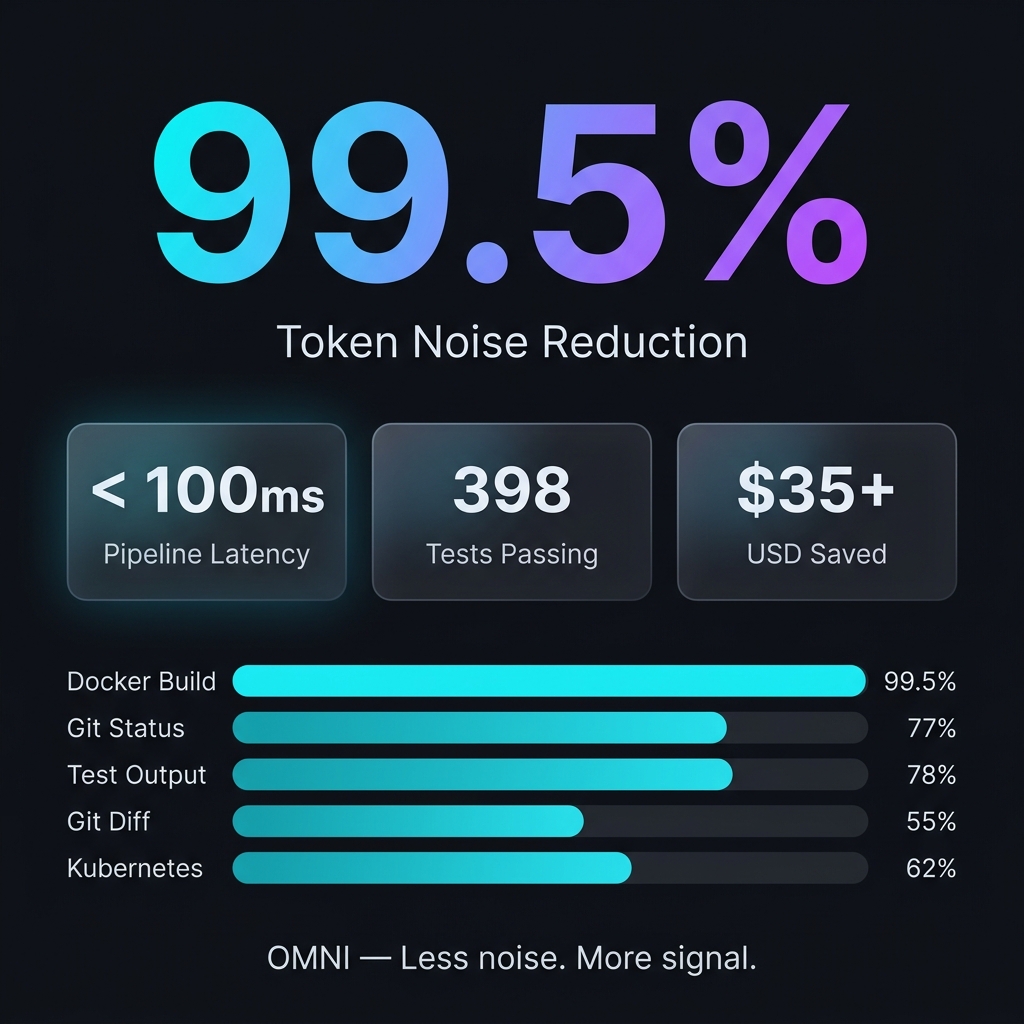
Where the saving actually comes from, over the same 1,810 executions:
| Command | Calls | Input | Output | Saved |
|---|---|---|---|---|
cargo |
29 | 424 KB | 13 KB | 96.8% |
git |
256 | 5.9 MB | 509 KB | 91.3% |
ls |
52 | 71 KB | 29 KB | 59.5% |
kubectl |
212 | 4.4 MB | 2.3 MB | 48.0% |
find |
39 | 83 KB | 53 KB | 36.2% |
grep |
184 | 534 KB | 385 KB | 27.8% |
cat |
85 | 515 KB | 468 KB | 9.1% |
git and cargo carry the result; cat and grep are close to a no-op. OMNI
earns its place on noisy, repetitive tooling output and gets out of the way
everywhere else.
Single fixtures from tests/fixtures/, if you want to reproduce one by hand:
| Command / Context | Input | Output | Saved |
|---|---|---|---|
cargo build (large, successful) |
3,220 B | 9 B | 99.7% |
cargo test (490 passed, 10 failed) |
16.5 KB | 1,100 B | 93.3% |
pytest (failures) |
730 B | 136 B | 81.4% |
git status (dirty) |
496 B | 113 B | 77.2% |
git diff (multi-file) |
397 B | 220 B | 44.6% |
docker build (heavy noise) |
9.2 KB | 5.8 KB | 37.2% |
kubectl get pods (mixed) |
840 B | 762 B | 9.3% |
Latency is a real cost, not zero. OMNI runs on every hooked command, and the
price grows with your history: a 496-byte git status takes ~82 ms against a
fresh database and ~308 ms against a 97 MB one. A 16.5 KB cargo test takes
~276 ms. Budget for it.
To see your own actual token savings, just run omni stats after a few days of usage.
Omni is incredibly easy to set up. It natively integrates into your terminal.
macOS / Linux:
# 1. Install via Homebrew
brew install fajarhide/tap/omni

# 2. Setup Omni (Interactive Menu for Claude, VS Code, OpenCode, Codex, Antigravity)
omni init

# 3. Verify it's working
omni doctor

# 4. Or auto-fix any issues
omni doctor --fix

# 5. Check Current Status
omni init --status
Universal Installer (macOS / Linux / WSL):
curl -fsSL omni.weekndlabs.com/install | bash
Windows (PowerShell):
irm omni.weekndlabs.com/install.ps1 | iex
OMNI works seamlessly with the agentic tools you already use. It intercepts their terminal executions automatically.
OMNI isn't just a terminal filter—it's a cure for AI amnesia.
If you've ever worked with an AI agent for more than an hour, you know the pain of context loss. You restart the agent, and suddenly it forgets what you were working on. It forgets the project goal. It starts making the exact same mistakes it made yesterday because it forgot the repository's undocumented quirks.
OMNI's Memory OS runs silently in the background to solve this:
omni goal): Set your North Star objective once. OMNI will relentlessly remind the agent of this exact priority on every single prompt, preventing it from drifting off-task.omni remember): Stop fixing the same hallucination. Agents can save project-specific rules, gotchas, and architecture decisions directly into OMNI's local SQLite backend. When they get stuck later, they automatically pull the exact answer back out via semantic search.Your agent gets smarter about your codebase every single day, and you never have to repeat yourself again.
Omni operates purely locally using a deterministic Read → Guard → Score → Collapse → Distill → Persist pipeline.
flowchart LR
    Command[Raw Tool Output] --> Hook[Omni Hook]
    Hook --> Score[Scorer Engine]
    Score -->|Critical=1.0, Noise=0.1| Distill[Content Distiller]
    Distill --> Clean[Clean Context]
    Command --> SQLite[(RewindStore SQLite)]
If the AI really needs the dropped noise, OMNI's local SQLite RewindStore keeps the full uncompressed log safely hashed, allowing the agent to retrieve it anytime.
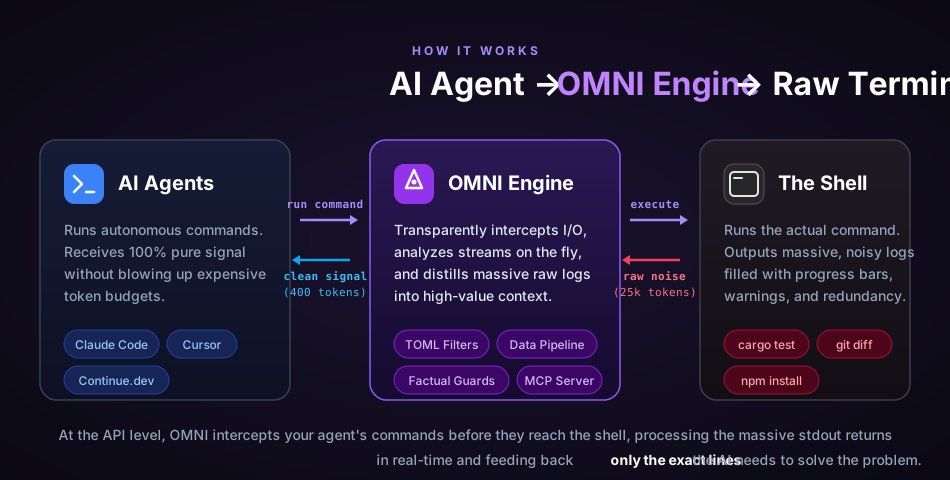
Built in Rust, though the end-to-end cost is not zero.
# Development
cargo build --release
cargo test --all
make fmt && make clippy
Does Omni permanently delete my logs?
No. The raw logs are compressed and stored locally in the SQLite RewindStore. The AI receives a hash and can retrieve the full log if needed.
Will this slow down my terminal?
Yes, measurably, and the cost grows with your history. The distillation pipeline itself runs in single-digit milliseconds, but every hooked command also writes to the local RewindStore: a 496-byte git status takes ~82 ms against a fresh database and ~308 ms against a 97 MB one, and a 16.5 KB cargo test takes ~276 ms. Budget for it. OMNI_PASSTHROUGH=1 skips the pipeline entirely when you need the raw output back.
Can I add my own filters?
Yes. You can teach OMNI to strip noise specific to your internal tools using TOML:
# ~/.omni/signals/custom.toml
[filters.my_tool]
match_command = "^internal-tool\\b"
strip_lines_matching = ["^DEBUG", "syncing..."]
This is a passion project built for the era of Agentic AI. Whether you're here to save money on tokens, test out free models, or help build the ultimate agentic toolbelt, contributions are always welcome!
make ci and cargo build. Read our CONTRIBUTING.md for details.